
TL;DR
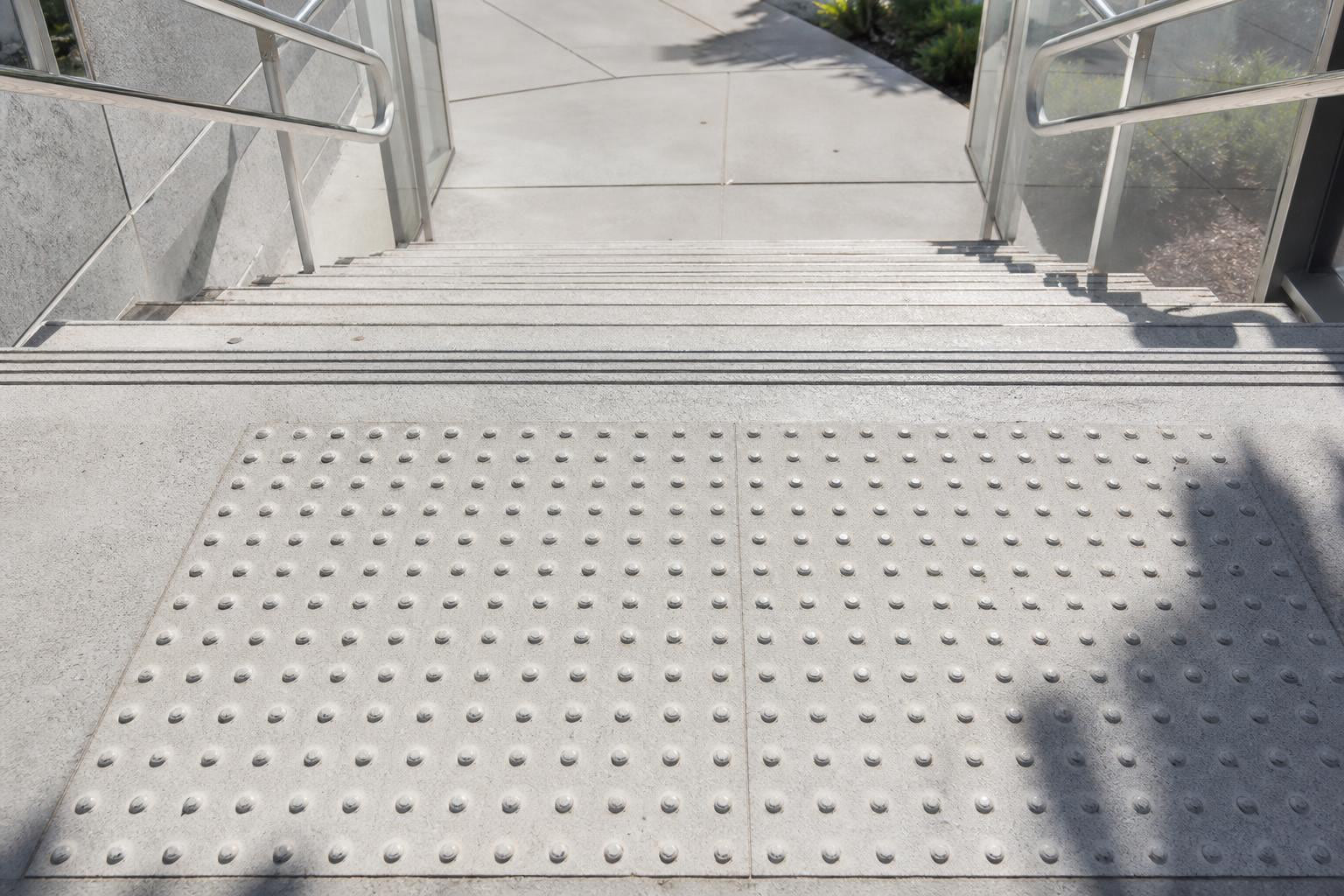
Tactile indicators at stairs are raised truncated dome surfaces installed on stair landings to warn visually impaired pedestrians of an approaching staircase. They are required under CSA B651, the Ontario Building Code, AODA, and various provincial codes across Canada. The indicators must be placed one tread depth back from the top step nosing, extend the full width of the stairs, and measure 600 to 650 mm deep. They belong on the landing only, never on the stair treads themselves.
What Are Tactile Indicators at Stairs?
Tactile indicators at stairs are standardized textured surfaces, most commonly featuring a grid of flat-topped truncated domes, installed on the landing at the top of a staircase. Their purpose is simple: warn a person with vision loss that a set of stairs is directly ahead so they can locate a handrail and descend safely.
These indicators go by several names. You will see them called Tactile Walking Surface Indicators (TWSIs), tactile attention indicators, detectable warning surfaces, or simply truncated domes. Regardless of the label, they all refer to the same thing when placed at stairs: a raised dome surface that is detectable underfoot and by long cane.
Attention Indicators vs. Guidance Indicators
This distinction trips people up constantly, so it is worth getting right early. Two types of TWSIs exist:
- Attention indicators use truncated domes arranged in a grid pattern. They signal hazards like stairs, transit platform edges, curb ramps, and drop-offs.
- Guidance indicators use elongated parallel bars that direct pedestrians along a path of travel.
At stairs, only attention indicators (domes) are used. Guidance indicators, such as directional bar tiles, serve a different function entirely: wayfinding along corridors, sidewalks, and open spaces. Mixing up the two is a compliance mistake that shows up more often than you would expect.
Purpose: How Tactile Indicators Work at Stairs
A visually impaired person walking toward a staircase has no visual cue that the ground is about to drop away. Tactile indicators solve this by creating a distinct texture change underfoot. The truncated domes are immediately recognizable through shoe soles and through a long cane, giving the person enough warning to stop, orient themselves, and find the handrail.
The high-contrast colour (typically safety yellow) also helps people with low vision spot the hazard zone. According to CSA and ISO specifications, the recommended colour is safety yellow (Munsell Colour System: hue 5.0, chroma yellow 8.0/12), and the panel must achieve 70 to 100 percent luminance contrast with the adjacent walking surface.
What Tactile Indicators at Stairs Are Not
One of the most persistent misconceptions is that tactile indicators create a slip-resistant surface on the stairs themselves. They do not. As Latham Australia’s code reference explains, placing tactile indicators on stair treads can actually create confusion for a vision-impaired person and may serve as a trip hazard.
The anti-slip function on stair treads belongs to stair nosings, which are an entirely separate product. Tactile indicators go on the landing. FRP stair tread nosings or aluminum stair nosings handle the slip-resistance job on the tread edge itself. Both products may be required at the same staircase, but they serve different purposes and should never be confused.
Where Exactly to Place Tactile Indicators at Stairs
Placement rules are precise. Getting the position wrong by even a few centimetres can create confusion rather than safety.
Setback from the Top Step
The attention indicator surface must begin one tread depth back from the leading edge of the nosing at the top step. It then extends across the full width of the stairs. This setback gives the person enough space to stop after detecting the domes and before reaching the stair edge.
The depth of the tactile indicator field at the top of stairs should be 600 to 650 mm according to CSA B651. The Ontario Building Code (Section 3.8.3.18) allows a slightly different range: not less than 300 mm and not more than 610 mm. This variance matters. If your project is in Ontario, check the OBC minimum rather than assuming the CSA range applies without modification.
Every Flight, Not Just the First
This is where multi-flight staircases become tricky. Tactile indicators must be placed at the top of each flight of stairs, not only at the very top of the stairway system.
The BC Building Code Interpretation Committee made this explicit: “When a visually challenged person is descending several flights of stairs, they are not aware when they have reached the bottom of the stairs. Therefore, it is important to identify the top of each flight of stairs to warn the user of the start on a subsequent flight.” Source: BC Building Code Interpretation
Landings Longer Than 2,100 mm
When a landing exceeds 2,100 mm in length and does not incorporate continuous handrails on both sides, tactile indicators are required at the top of each flight adjoining that landing. The logic is straightforward: on a long landing without continuous handrails, a person may lose their orientation and not realize another flight is ahead.
Interrupted Stair Patterns
Tactile indicators must also be present wherever the regular stairway pattern is interrupted. If a staircase changes direction, if a landing introduces a corridor junction, or if the stair rhythm breaks for any reason, the code requires a fresh set of attention indicators.
Physical Specifications: Truncated Dome Dimensions
The dome geometry is standardized under CSA B651 and ISO 23599. Here are the numbers:
| Specification | Measurement |
|---|---|
| Dome height | 4 to 5 mm |
| Top diameter | 12 to 25 mm |
| Base diameter | Top diameter + 10 mm (± 1 mm) |
| Grid pattern | Square, parallel to travel or diagonal at 45° |
| Panel depth at stairs (CSA B651) | 600 to 650 mm |
| Panel depth at stairs (OBC) | 300 to 610 mm |
| Colour contrast | 70 to 100% luminance contrast with adjacent surface |
| Preferred colour | Safety yellow |
These dimensions are not arbitrary. The dome height of 4 to 5 mm is a deliberate compromise between detectability for people with vision impairments and minimizing discomfort for people with mobility impairments. Taller domes would be easier to detect but would create greater trip and wheelchair hazards.
Canadian Codes That Govern Tactile Indicators at Stairs
Multiple overlapping codes apply across Canada. This is not a single-standard country when it comes to accessibility.
CSA B651:23 (Clause 5.4.3)
The national reference standard. Clause 5.4.3, titled “Tactile attention indicator surfaces at stairs,” sets out the foundational requirements for setback, depth, width, and dome specifications. The standard was originally created in 2004 and updated in 2012 and again in 2018 before its current 2023 edition.
National Building Code of Canada (NBC)
The NBC references CSA B651 for TWSI specifications. While the NBC itself does not include granular dome dimensions, it directs designers and code officials to the CSA standard for compliance details.
Ontario Building Code (OBC 3.8.3.18)
Ontario has its own section specifically covering tactile attention indicators. It requires compliance with ISO 23599 and sets the depth range at 300 to 610 mm. Section 3.8.3.18 is the key reference for any Ontario project.
AODA (O. Reg. 191/11)
The Accessibility for Ontarians with Disabilities Act mandated TWSIs at all new and redeveloped public spaces effective January 2016. This applies to both indoor and outdoor environments.
BC Building Code
British Columbia requires TWSIs set back one tread from the top riser per CSA B651 and has issued formal interpretations clarifying the multi-flight requirement.
ISO 23599:2019
The international master specification for TWSI geometry, contrast, and installation. Both the OBC and CSA reference this standard.
Accessible Canada Act
New CAN-ASC standards currently under development will apply to federal entities and are expected to exceed current OBC minimums. The draft CAN-ASC-21 standard for outdoor spaces already addresses stairs and TWSIs.
Provincial, territorial, and municipal regulations can impose additional requirements beyond these national and provincial standards. For institutional and government projects, always check the local authority having jurisdiction before finalizing your specification.
Installation Methods
Three primary methods exist for installing tactile indicators at stairs. The choice depends on whether the project is new construction or a retrofit, and on the substrate material.
Cast-in-Place
The preferred method for new construction. Tactile indicator panels are set directly into wet concrete so the finished surface is flush with the surrounding ground. This produces the most durable, seamless result. Cast-in-place tactile panels integrate permanently with the concrete slab and eliminate any raised edge concern.
Surface-Applied Panels (Retrofit)
When a staircase already exists and the landing is finished concrete, tile, or another hard surface, surface-applied panels are the practical option. These panels adhere or bolt onto the existing surface.
Key rules for surface-applied installations: the panel must feature bevelled edges, and the base surface must not exceed 3 mm above the existing walking surface. Panels must be attached firmly to prevent edges from lifting.
This last point matters more than many installers realize. A practitioner on Safety Step Canada’s own product review page reported that lightweight tiles glued down with adhesive alone lifted within days, raising the question of whether mechanical fasteners should have been used instead. Adhesive-only installation on improper substrates is one of the most common field failures.
Individual Drill-In Studs
For wood floors, meshed stairs, or carpet applications, individual tactile indicator studs can be drilled in one at a time using a template. Each stud has a countersunk screw opening and is anchored with standard screws (or bolts and washers on mesh). Stainless steel studs are common in high-end interior applications where aesthetics matter.
Common Mistakes to Avoid
Placing Indicators on the Stair Treads
This is the number one error. Tactile indicators belong on the landing, one tread depth before the stairs begin. Putting them on the stair treads themselves confuses visually impaired users (who expect domes to mean “hazard ahead, stop”) and can create a trip hazard for everyone else.
Using Too Many Tiles
More is not better. As ADA Tile’s installation guide notes, oversized or excessive tactile surfaces cause confusion about direction of travel and create large areas of uneven surface that present problems for wheelchair users and people using walkers.
Missing Intermediate Landings
On multi-flight staircases, some installers place indicators only at the very top landing and skip intermediate floors. Every flight needs its own tactile warning at the top.
Wrong Indicator Type
Guidance bars (directional indicators) do not belong at stairs. Only truncated dome attention indicators are correct for stair locations.
Adhesive-Only on Exterior Substrates
Temperature swings, moisture, and foot traffic can defeat adhesive bonds quickly. For exterior retrofit applications, mechanical fasteners or a combination of adhesive and fasteners are strongly recommended.
Putting Domes Where No Level Change Exists
One practitioner on The Building Code Forum shared that a client received a nuisance lawsuit after placing truncated domes in an area where no change in level existed. False warnings erode trust in the system. If a visually impaired person encounters domes repeatedly in areas without hazards, they learn to ignore them, which defeats the entire purpose.
Tactile Indicators vs. Stair Nosings: What’s the Difference?
These two products get confused constantly because they both appear at staircases. They serve completely different functions.
| Feature | Tactile Indicators | Stair Nosings |
|---|---|---|
| Purpose | Warn visually impaired users of approaching stairs | Provide anti-slip traction on stair tread edges |
| Location | Landing at top of stairs | Front edge of each stair tread |
| Who benefits | Primarily people with vision impairments | Everyone using the stairs |
| Surface | Truncated domes | High-grip abrasive or textured edge |
| Code basis | CSA B651, OBC 3.8.3.18, AODA | Building code slip-resistance requirements |
A compliant staircase often needs both. The tactile indicator panel sits on the landing, and stair nosings run along every tread edge. They are different products, different line items in your specification, and different sections of the building code.
Materials for Tactile Indicators at Stairs
The right material depends on traffic volume, location (indoor vs. outdoor), aesthetics, and budget.
| Material | Best Application | Durability | Relative Cost |
|---|---|---|---|
| Fiberglass polymer composite (FRP) | Exterior retrofit, surface-applied | High, UV-stable | Moderate |
| Cast iron | Municipal sidewalks, transit platforms | Very high | Higher |
| Stainless steel (316L) | High-end interiors, individual studs | Very high | Premium |
| Polyurethane (PU) | Flexible retrofit, temporary installs | Moderate | Lower |
| Vitrified polymer composite | Heavy-traffic exterior | Very high | Moderate to high |
The City of Toronto uses cast-iron TWSI plates at many municipal locations. Cast iron develops a rusty patina over time that actually provides natural high-contrast visibility against concrete, an unintentional but useful byproduct. Toronto ran a pilot project from November 2012 to July 2013 testing four different TWSI products at one intersection to evaluate durability and detectability.
With proper installation and maintenance, quality tactile indicators last 10 to 15 years outdoors and 20+ years indoors.
For curved stair landings or radius applications, radius tactile panels are available to maintain code-compliant coverage without cutting standard rectangular panels.
Choosing and Ordering Compliant Tactile Indicators
Once you understand the placement rules and specifications, the next step is selecting panels that meet CSA B651 and ISO 23599 requirements in the correct size for your stair width.
Browse compliant tactile indicator panels in surface-applied, cast-in-place, cast-iron, and flexible PU formats. Orders ship the next business day for in-stock items, which matters when a project inspection is approaching and you need panels on-site fast.
For questions about which product suits your specific stair configuration, see the frequently asked questions page or contact the team directly.
Frequently Asked Questions
Do tactile indicators go on the stairs or on the landing?
On the landing only. Tactile attention indicators are placed one tread depth back from the top step nosing and extend across the full width of the stairs. They should never be placed on the stair treads themselves, as this creates confusion for visually impaired users and a potential trip hazard.
How deep should the tactile indicator panel be at stairs?
CSA B651 recommends 600 to 650 mm. The Ontario Building Code allows a range of 300 to 610 mm. Check which code governs your jurisdiction, because the acceptable ranges differ.
Are tactile indicators required at every flight in a multi-flight staircase?
Yes. The BC Building Code Interpretation Committee and CSA B651 both require tactile attention indicators at the top of each flight, not just the first. This is because a person descending multiple flights needs warning before each new descent.
What is the difference between attention indicators and guidance indicators?
Attention indicators use truncated domes and warn of hazards (stairs, platform edges, curb ramps). Guidance indicators use elongated parallel bars and direct pedestrians along a path. Only attention indicators are used at stairs.
Can I use adhesive alone to install surface-applied tactile panels?
Adhesive-only installations are risky, especially outdoors. Temperature changes, moisture, and heavy foot traffic can cause panels to lift. Mechanical fasteners or a combination approach is strongly recommended for long-term durability.
When did AODA require tactile indicators at stairs in Ontario?
AODA mandated TWSIs at all new and redeveloped public spaces effective January 2016 under O. Reg. 191/11.
What colour should tactile indicators be?
Safety yellow is the recommended colour, specified as Munsell hue 5.0, chroma yellow 8.0/12. The key requirement is 70 to 100 percent luminance contrast with the surrounding walking surface.
How long do tactile indicators last?
Quality, code-compliant tactile indicators typically last 10 to 15 years in outdoor installations and 20 or more years indoors, assuming proper installation and routine maintenance.